"Charlie Bit My Finger" -- a private family video which unexpectedly became one of the earliest global viral videos on YouTube -- has been officially preserved by the British Film Institute (BFI).
[Read More]
"Charlie Bit My Finger" -- a private family video which unexpectedly became one of the earliest global viral videos on YouTube -- has been officially preserved by the British Film Institute (BFI).
When you search Google for something topical, you might see a cluster of headlines from news outlets, reporting breaking stories related to your search query. If you want to focus on those results, you can click to see More news, or navigate to the News tab at the top of the screen.
How these news sources are chosen depends on a variety of signals and factors—just the same as any other Google results—but you now have the ability to set “preferred” sources that will always show up first.
Ma
When you search Google for something topical, you might see a cluster of headlines from news outlets, reporting breaking stories related to your search query. If you want to focus on those results, you can click to see More news, or navigate to the News tab at the top of the screen.
How these news sources are chosen depends on a variety of signals and factors—just the same as any other Google results—but you now have the ability to set “preferred” sources that will always show up first.
Maybe you want more New York Times and less CNN, or vice versa—Google will let you pick your favorites (which hopefully include Popular Science). This can also help you surface content from news sources you wouldn’t otherwise see in Google, like a local website covering your area.
How to set preferred sources
Setting preferred sources on Google. Screenshot: Google
If you run a Google search on the web for something in the news, topical enough that the Top stories box comes up in your results, you can then click the small icon next to the Top Stories heading to pick your sources. The icon looks like a couple of rectangles with a plus symbol on top.
This brings up a new dialog, where you can pick specific sources. Just start typing the name of the website you want to read more often, and select it when it appears. You can’t add any website on the internet though, only those that are regularly updated (and therefore qualify as news sites).
While there’s no specific set of rules about how often preferred sources show up, Google says you’ll see them “more often” than other outlets. As you add more sources, you’ll see the option to Reload results based on your last search. This should now include your selected sources, as long as they’ve published something related to your search recently.
You can head back to this dialog via the Top stories box whenever you want, and add new preferred sources or remove existing ones—there’s actually no limit to the number of sources you can add, so you’re able to cover a full gamut of perspectives and topics. You can also head to google.com/preferences/source directly in your web browser.
Many news websites have now started adding Add as a preferred source on Google badges on their articles, which you can click directly to jump to the preferred sources dialog. In our articles, you’ll find it’s labeled Add Popular Science, just under the headline and sub-heading—click the link to add us.
Preferred sources and Google News
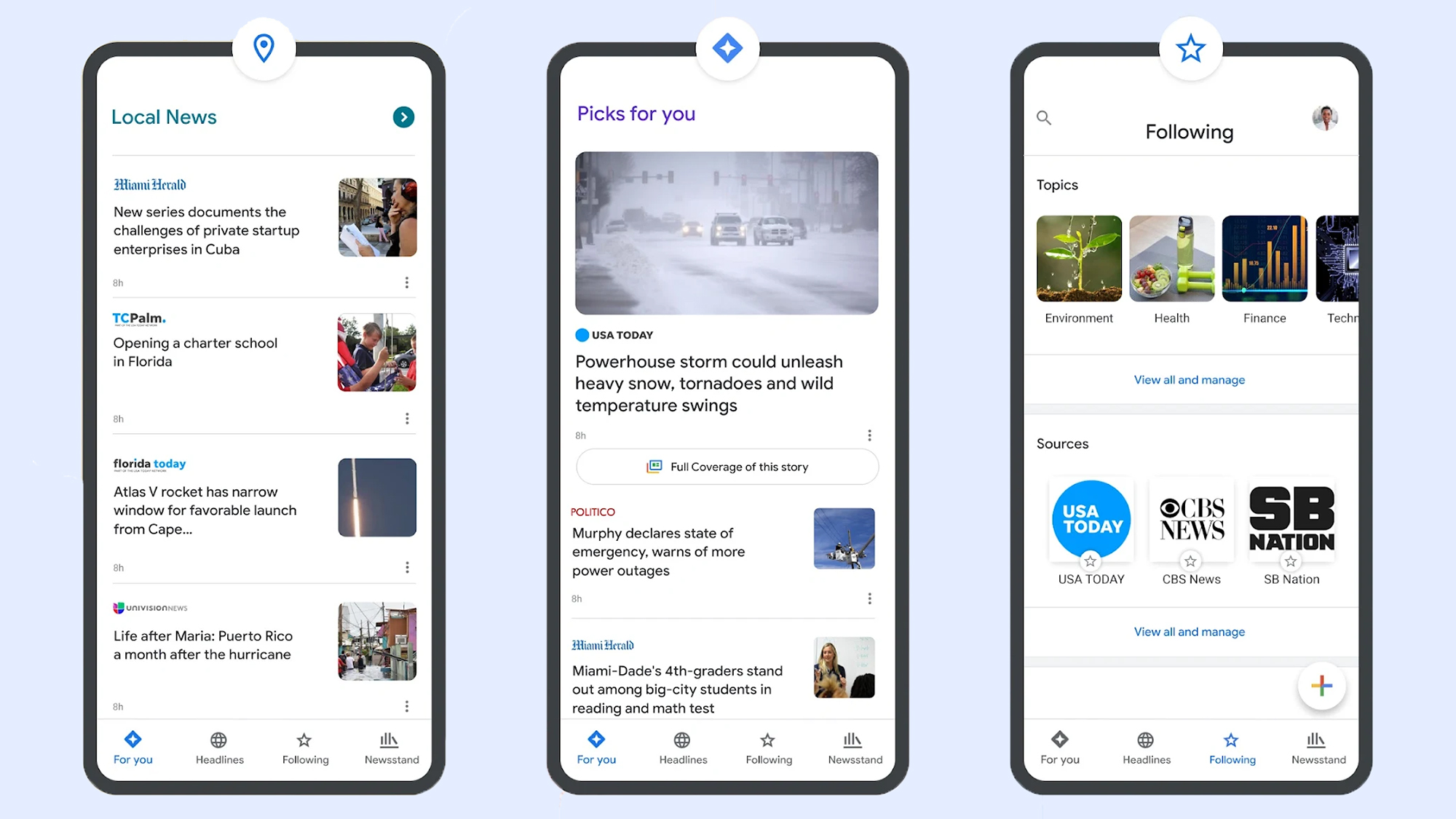
Google News also lets you select your favorite topics. Screenshot: Google
Google hasn’t officially said anything about how preferred sources in Google search relates to the dedicated Google News website and apps for Android and iOS, but there is some overlap here.
If you head to Google News on the web and then open the Following tab, you’ll see that the preferred sources you’ve selected via search are also listed under Sources. However, there’s no way (at the moment) to add new sources from Google News—you need to go through Google search.
On the dedicated Google News portal, if you click the three dots next to any story, you can opt to see more stories or fewer stories like it—but you can’t specifically request to see more of a particular publisher. You can block an outlet though, by choosing Hide all stories from… on the same menu.
There are other factors that affect your Google News selection as well, and if you scroll down the front page of Google News to the Your topics section, there’s a Customize button to the right. Click on this, and you can tell Google News which topics you want to see more of (like sports, entertainment, and business, for example).
We may well see a closer connection between preferred sources and Google News in the future, but for now there are a variety of ways to customize the stories you get served up inside Google’s portals. If you’re spending a lot of time reading news, it’s worth making sure your favorite publishers appear first.
For a few select evenings in the late spring and early summer, sunlight aligns with Manhattan’s grid. The city’s bustling streets are washed with golden light as the sun sets, while tourists and locals alike flood the streets to snap that perfect picture. This event is nicknamed Manhattanhenge and it will begin on May 28 and continue through July 12.
However, you don’t need to live in the Big Apple to see a “henge” like Manhattanhenge. They actually pop up in a few places and a website calle
For a few select evenings in the late spring and early summer, sunlight aligns with Manhattan’s grid. The city’s bustling streets are washed with golden light as the sun sets, while tourists and locals alike flood the streets to snap that perfect picture. This event is nicknamed Manhattanhenge and it will begin on May 28 and continue through July 12.
However, you don’t need to live in the Big Apple to see a “henge” like Manhattanhenge. They actually pop up in a few places and a website called Hengefinder can help you find the closest henge.
Meet Hedgefinder
Data scientist and engineer Victoria Ritvo created the website, while software engineer John Pribyl built the accompanying app. Ritvo wrote about creating Hedgefinder in her blog, and details the three basic steps that scientists can use to find a henge. First, find the angle of the road, or its bearing relative to true north. Second, find the angle of the sun at sunset, or its azimuth. Third, find the dates when those two angles match.
While you don’t have to do any of that high-level math, you can read about how Rivoto and Pribyl made their calculations. You simply put in an address or city and can get a calculation for the closet henge near you.
“Having Hengefinder active means henges are now explorable outside of Manhattan, and I’ve been searching for them using the app,” Ritvo writes. “My favorite one so far, I haven’t actually seen. I’m intrigued by the Haarlemmertrekvaart, a canal which traces the southern edge of Westerpark in Amsterdam.”
Interestingly, much of Europe is left out of henge mania due to medieval street design. Amsterdam’s famed canals do offer an option, where sunlight can reflect off of the water. Henges may have been occurring twice a year for the past 400 years on the Haarlemmertrekvaart.
How henges work
The sun does not set in the same place every day. Its position changes along the horizon with the seasons. While the angle does not usually match the directions of a street, it will on a few days each year if the street is angled correctly.
In 1997, the term Manhattanhenge was first coined by Neil deGrasse Tyson, an astrophysicist and director of the Hayden Planetarium at New York’s American Museum of Natural History. Tyson noted that the setting sun framed by Manhattan’s building was comparable to how the sun’s rays strike the center of England’s Stonehenge on the solstice. The Neolithic humans who built the stone circle in stages between 3100 BCE and 1600 BCE intended for the light to shine that way on the solstice. But the builders of Manhattan? Not so much.
Chicagohenge in Illinois and Baltimorehenge in Maryland both occur when the sunset lines up with the grid systems in those cities around the spring and fall equinoxes in March and September. In Canada, Torontohenge occurs in February and October.
Site takes no action over hate posts against UK politicians including Kemi Badenock, Shabana Mahmood and Zia Yusuf X has refused to take down dozens of social media posts reported as “hate, abuse or harassment” in which prominent UK politicians, including Kemi Badenoch, have been racially abused.In May, researchers from the social inclusion thinktank British Future reported 30 posts from this year in which the Conservative party leader was called the N-word. In each case the researchers used th
Site takes no action over hate posts against UK politicians including Kemi Badenock, Shabana Mahmood and Zia Yusuf
X has refused to take down dozens of social media posts reported as “hate, abuse or harassment” in which prominent UK politicians, including Kemi Badenoch, have been racially abused.
In May, researchers from the social inclusion thinktank British Future reported 30 posts from this year in which the Conservative party leader was called the N-word. In each case the researchers used the platform’s “hate, abuse or harassment” reporting option. X refused to act in the majority of cases, despite repeated requests.
Measures to include restrictions on ‘safe’ social media apps, with some fearing banning some platforms and not others will lead to legal challengesTeenagers under the age of 16 are to be banned from accessing “high-risk” social media apps while safer platforms will be subjected to restrictions, under a sweeping government crackdown.Under-18s will also be banned from using romantic or sexual AI chatbots after a consultation on keeping children safe online. Continue reading...
Measures to include restrictions on ‘safe’ social media apps, with some fearing banning some platforms and not others will lead to legal challenges
Teenagers under the age of 16 are to be banned from accessing “high-risk” social media apps while safer platforms will be subjected to restrictions, under a sweeping government crackdown.
Leftover Altoid tins are staple components in all types of handy, DIY projects. Once you eat the mints, the aluminum containers routinely house basic first aid kits, miniature speakers, sewing accessories, and even watercolor paints. But for the YouTuber Exercising Ingenuity, one specific use came to mind.
“Have you ever looked at a tin of Altoids and thought, ‘That looks like a tiny computer?’” he asked in a video on May 9.
Of course, whether or not you imagined the same endeavor is besid
Leftover Altoid tins are staple components in all types of handy, DIY projects. Once you eat the mints, the aluminum containers routinely house basic first aid kits, miniature speakers, sewing accessories, and even watercolor paints. But for the YouTuber Exercising Ingenuity, one specific use came to mind.
“Have you ever looked at a tin of Altoids and thought, ‘That looks like a tiny computer?’” he asked in a video on May 9.
Of course, whether or not you imagined the same endeavor is beside the point—because the creator went ahead and did it. The final result may not be the most versatile pocket computer ever designed, but it definitely is one of the most portable.
Exercising Ingenuity was particularly inspired by cyberdecks, which first rose to prominence among hackers during the 1980s. The term originated in William Gibson’s landmark 1984 science fiction novel Neuromancer, and basically boils down to a rugged standalone laptop (with a little bit of punk flare thrown in for good measure). Most actual cyberdeck projects are built with an emphasis on utility and resilience, but Exercising Ingenuity’s chief goal was to make his variant as small as possible.
The problem wasn’t finding an appropriately tiny CPU and LCD screen—a Raspberry Pi Zero and an old, two-inch display both did the trick. Instead, the more difficult challenge was cramming a mechanical keyboard into the pocket-sized tin. That required learning how to construct a diode matrix configuration typing input, then individually assembling and soldering each key on his keyboard. Although the time-lapse video makes the job look incredibly frustrating and hard on the fingers, the YouTuber swears it was a “really enjoyable part of the project.” To each their own.
Typing will remain a challenge unless you have very small fingers. Credit: YouTube
From there, it was a matter of designing a flexible 3D-printed interior frame and cramming everything into the tin. This was easier said than done, and required the hobbyist to trim down as much wiring as possible while also soldering parts like the UPS board and LCD display directly onto the Raspberry Pi. Despite literally and figuratively cutting every possible corner to make room for all of the components, the final result still required swapping out the tin’s hinges with slightly larger replacements to ensure the case could close shut.
With every hurdle cleared, it was simply a matter of booting up the contraption to give it a test run. Exercising Ingenuity says the final product worked flawlessly, and he was even able to program a small motor to run using his Altoid cyberdeck. Actually typing on the keyboard still looks like a labor of love, but the overall result remains very cool. Its inventor even made all of the designs available online for free, in case any aspiring cyberpunks are looking to recycle an old mint tin.
In The Workshop, Popular Science highlights the ingenious, delightful, and often surprising projects people build in their spare time. If you or someone you know is working on a hobbyist project that fits the bill, we’d love to hear about it—fill out this form to tell us more.
It's an icon of early internet videos: 12 badgers doing calisthenics while a mushroom and snake occasionally appear on screen, known as "Badger Badger Badger" or "The Badger Song."
[Read More]
It's an icon of early internet videos: 12 badgers doing calisthenics while a mushroom and snake occasionally appear on screen, known as "Badger Badger Badger" or "The Badger Song."
Parents around the world are responding to growing research showing that excessive screen time, especially for young children, may have negative cognitive effects. But what happens when a well-meaning parent wants to introduce their child to subjects intrinsically linked to screens, like computer programming? A new learning series from Japanese public broadcaster NHK called Texico aims to help solve that dilemma by using paper, plastic toys, and everyday objects to break down the core concepts a
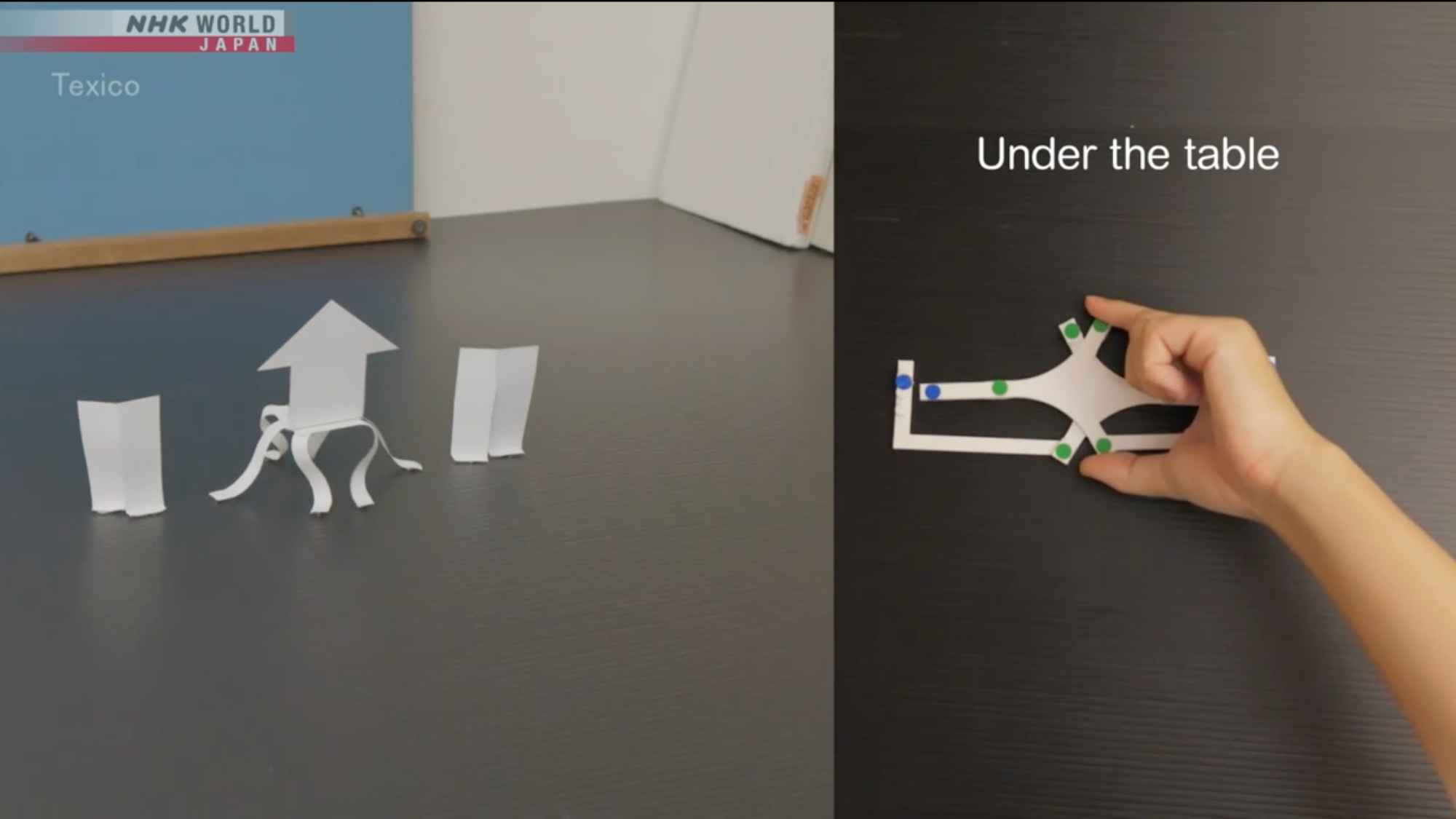
Parents around the world are responding to growing research showing that excessive screen time, especially for young children, may have negative cognitive effects. But what happens when a well-meaning parent wants to introduce their child to subjects intrinsically linked to screens, like computer programming? A new learning series from Japanese public broadcaster NHK called Texico aims to help solve that dilemma by using paper, plastic toys, and everyday objects to break down the core concepts and strategies essential to programming.
Each episode in the series runs about 11 minutes and focuses on key concepts including analysis, combination, abstraction, and simulation. The goal, NHK says, is to help children “learn the principles of programming without even touching a computer.”
Each 11 minute episode breaks down some of the essential strategies needed for programming. Image: Texico.
‘If you think hard enough, you can see the underlying logic,’
In one episode, a toy train on a plastic track approaches a lowered rail crossing. Viewers are asked to visualize what will happen when the train makes contact with the barrier. In this case, both the train and the lowered rail continue moving forward.
The next segment complicates the scenario: the track now forms a circle, with the train, rail, and a wooden triangle block all positioned at different points. When the rail moves, so does the block. Viewers are asked to recall what happened in the previous example and apply that logic to the new configuration, essentially practicing the kind of mental simulation that underlies real programming work.
Another episode teaches foundational logic by asking viewers to tear a sheet of paper into nine pieces. A teacher then selects one piece and instructs the viewer to write a number from one to nine and place it face down. The viewer then writes the remaining numbers on the other pieces, also face down, so the teacher can’t see it. The teacher then somehow correctly guesses which piece holds which number.
But the trick isn’t magic. Instead, it has everything to do with the geometry of tearing paper. It’s revealed that the first piece the teacher selected was the center of the sheet. When paper is torn into nine equal pieces, the center piece is the only one without any straight edges. So when the teacher went to identify it, they simply looked for the piece that didn’t look like the others.
It’s a simple but elegant demonstration of the kind of pattern recognition that programmers rely on constantly.
“If you think hard enough, you can see the underlying logic,” a voice in the video says, followed by the slightly creepy musical mantra “Texico, Texico, Texico.”
The train track can mimic what is going on inside the brain when doing real programming. Image: Texico.
The pull away from screens
Offline approaches to teaching computer concepts provide a way for newcomers of all ages interested in coding to get their feet wet without having to deal with distracting screens. For many, that’s a welcome reprieve. A recent YouGov poll found that more than half (57 percent) of adults in the United States spend at least five hours per day looking at screens. All that time starting into the digital glow has been shown to interfere with sleep and, in some cases, even contribute to anxiety and other mental health issues.
Screenless learning could also prove popular as parents and school districts push back against what many now see as an overreliance on screens. More than 35 states have enacted policies limiting smartphone use in classrooms. Districts in California and Oregon have recently gone further, adopting rules that restrict student use of laptops and tablets and prioritize pen and paper. Should that trend spread, it would mark a stark departure from the past two decades, during which “EdTech” was enthusiastically embraced and widely deployed in classrooms across the country.
“We are prioritizing developmentally appropriate learning during the most critical period for language, social, and cognitive development,” Jeanne Grazioli, a superintendent in a Southern Oregon schools district said after they moved to reduce screen time.
And while the debate over screens is far from settled, there is growing evidence that introducing concepts through analog methods pays dividends later on. In his recent book The Digital Delusion, neuroscientist and educator Dr. Jared Cooney Horvath points to research suggesting that students who learn to write by hand retain an advantage over those who move straight to typing, despite the fact handwriting has become increasingly less common in daily adult life.
”Many people believe that thinking happens entirely in the brain, as if we’re just gray matter hitching a rise inside a body,” Horvath writes. “But this misses something essential: we don’t merely have bodies—we are bodies. Learning doesn’t arise from the brain alone, it emerges from the rhythms, movements, and sensations of our entire physical selves.”
“Put simply, handwriting builds a foundation that typing cannot,” he adds.
Something similar may be at work when children learn programming basics through analog tools. And even if future research doesn’t bear that out conclusively, Texico offers something valuable on its own terms: a set of refreshing, screen-free puzzles that challenge young learners (and at least one adult tech writer) to flex their critical thinking skills.
TikTok executives decided not to disable notifications during school hours, ignoring recommendations from their own safety team, and paid millions of dollars to parents’ and teachers’ associations to promote the social network in schools. Snapchat sent alerts to teenagers while they were in class urging them to share what was happening in the classroom. Google executives knew that YouTube was recommending videos to students during the school day that were unrelated to their lessons. Meta paid “t
TikTok executives decided not to disable notifications during school hours, ignoring recommendations from their own safety team, and paid millions of dollars to parents’ and teachers’ associations to promote the social network in schools. Snapchat sent alerts to teenagers while they were in class urging them to share what was happening in the classroom. Google executives knew that YouTube was recommending videos to students during the school day that were unrelated to their lessons. Meta paid “teen ambassadors” to promote Instagram and hand out gifts to their classmates.
Waterfox - Open source web browserhttps://www.waterfox.comA privacy focused browser built for power users who value customization and control over their online experience#browser #internet #web #privacy #security
Hong Kong-born philosopher Yuk Hui was on track to become a computer engineer, but artificial intelligence led him to question consciousness, ethics, and our relationship with technology, ultimately prompting him to study philosophy in London. Seguir leyendo
Hong Kong-born philosopher Yuk Hui was on track to become a computer engineer, but artificial intelligence led him to question consciousness, ethics, and our relationship with technology, ultimately prompting him to study philosophy in London.
Renewable energy is the cornerstone of any sustainable society, but why limit your options to wind or solar installations? In the United States alone, over one million homes host a tiny, furry alternative power source without even realizing it. As a young YouTuber known as Flamethrower recently demonstrated, it’s time for hamsters to start pulling their weight around the house. Or, at the least, it’s time for them to start turning hamster wheels into miniature, makeshift turbines.
The idea ca
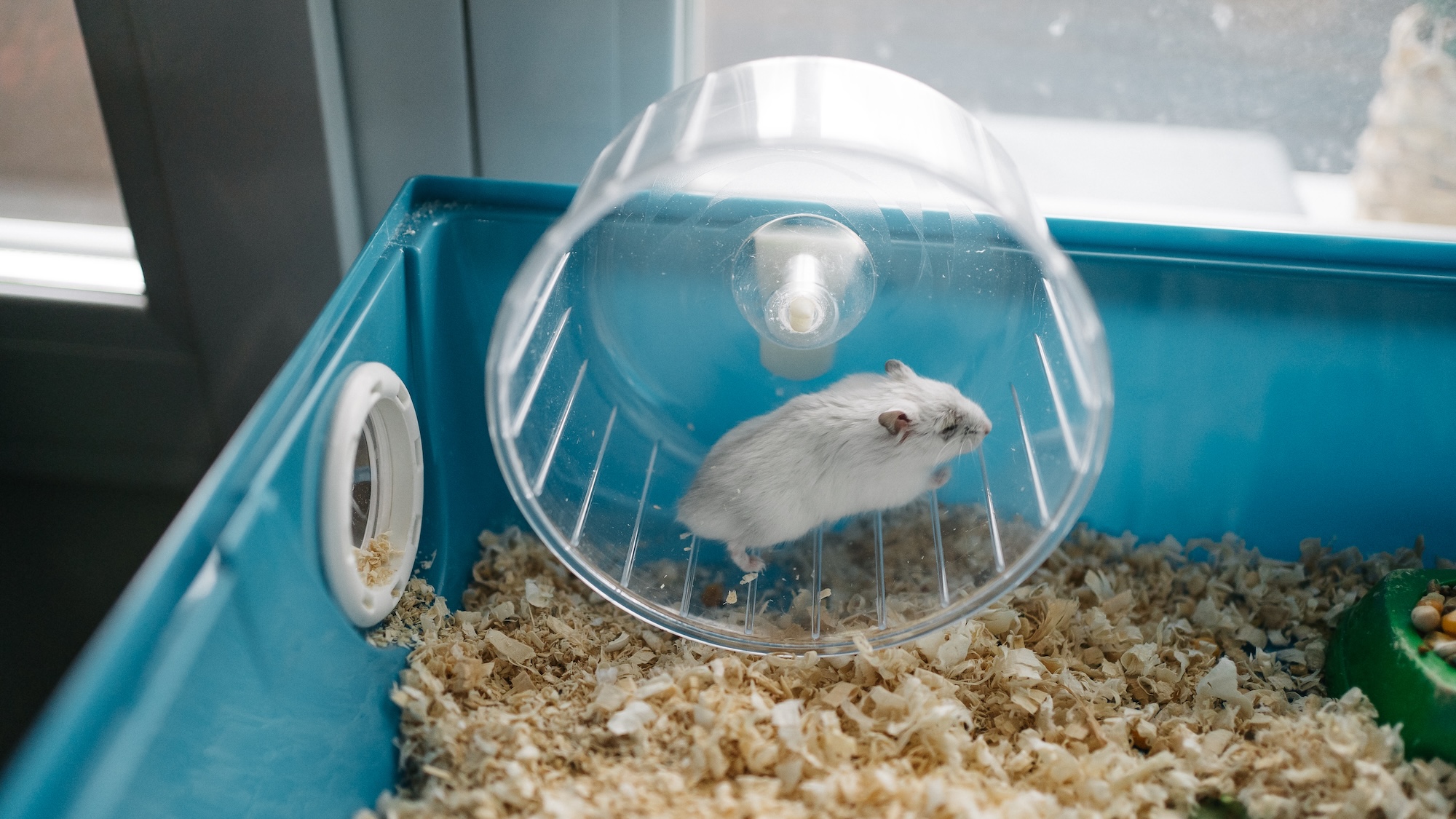
Renewable energy is the cornerstone of any sustainable society, but why limit your options to wind or solar installations? In the United States alone, over one million homes host a tiny, furry alternative power source without even realizing it. As a young YouTuber known as Flamethrower recently demonstrated, it’s time for hamsters to start pulling their weight around the house. Or, at the least, it’s time for them to start turning hamster wheels into miniature, makeshift turbines.
The idea came to Flamethrower after his brother received one of the tiny pets for his birthday. Although adorable, naturally nocturnal hamsters are often up at all hours of the night running on their little exercise accessories. While laying awake to the sound of a spinning, squeaky wheel, the amateur engineer realized how to make the best of an unexpectedly annoying situation.
“So what did I do? Exploit it for energy production, of course!” he declared in his recent video entry.
Turbines help generate most of the world’s energy, and their underlying principles are simple enough. Electricity funneled through wires to a motor will make it spin, but the reverse is also true—spin a motor, and electricity will generate through its terminals into battery storage. The fundamentals are basically the same whether a turbine spins thanks to steam, wind, or nuclear power. Or hamsters.
However, a hamster-powered turbine is not the easiest project to design. As the YouTuber explained, a 5 volt (V) DC motor hypothetically needs to spin at over 10,000 RPM to simply reach a smartphone’s standard 15 watt charging speed. Even if such a superpowered hamster existed, its speed would likely cause the motor to melt before it provided any juice to a battery—and therein lay another issue.
Batteries don’t only store energy—they are designed to provide electricity at a steady current when needed. However, a standard battery also must receive a higher voltage than it stores in order to amass any reserves.
Part of the solution came from a device known as an energy harvester module, which takes small voltages and amplifies them to an acceptable level for a battery. But the problem is that the amount of required voltage increases in direct proportion to the energy that’s being stored, meaning yet another unfeasible hurdle. The hobbyist ultimately relied on a system called maximum power point tracking (MPPT) to calculate the optimal input and output proportions for the energy harvester and a few other components.
All that potential energy is only as good as the battery that stores it, however. For this project, the YouTuber relied on lithium-ion cells salvaged from a broken electric scooter. Flamethrower hooked up his rig to the hamster wheel’s axis, then gave his brother’s pet the night to get its steps in. The next day, he attached his phone via a USB cable charging port to test the whole thing for the first time.
The initial setup worked flawlessly, although it charged at a snail’s pace. Naturally, he booted up his thermal camera nearby (who doesn’t own one?) to investigate any pain points in the system. It turns out the issue did have anything to do with the hamster wheel charger itself, but his outdated USB cable. After swapping that out with a newer replacement, phone charging sped up dramatically.
“And with that, my hamster’s life finally has a purpose,” the inventor declared.
As absurd as it appears, it’s hard to argue with such an ingenious source of free electricity. Hypothetically, the same idea could be adapted to basically anything in a house that spins mechanically, like a stationary bike. Then again, the whole point is to have the hamster do the work, not you. In any case, the YouTuber seems to be on to something here. The way Flamethrower tells it, the rodent may be more reliable than solar or wind energy.
“It’s supposed to be nocturnal but I’m starting to think it never sleeps,” he said.
In The Workshop, Popular Science highlights the ingenious, delightful, and often surprising projects people build in their spare time. If you or someone you know is working on a hobbyist project that fits the bill, we’d love to hear about it—fill out this form to tell us more.

 Login
Login