❌

Reading view

How to Reduce Operational Cost Through Strategic Business Outsourcing


Promoted Content.

Margin compression is forcing a reckoning for business leaders. The pressure to innovate, capture market share, and scale is relentless. Yet the escalating costs of domestic labor, inflation, and technology infrastructure are steadily eating away at profitability.

When the cost of simply keeping the business running outpaces revenue growth, companies hit a dangerous plateau.

Historically, business owners responded to this margin squeeze with a simple, tactical approach to outsourcing: finding the absolute cheapest overseas labor to handle baseline tasks.

However, this "race to the bottom" often resulted in poor work quality, constant communication breakdowns, and hidden management costs that negated any initial financial gains.

The paradigm has shifted. Forward-thinking companies are moving from tactical cost-cutting to strategic business outsourcing. This approach leans more towards structural optimization, converting rigid fixed costs into flexible variable costs, and freeing up expensive internal bandwidth.

Here is a comprehensive blueprint for significantly reducing operational costs through a strategic, risk-managed outsourcing framework.

The Foundation: The "Core vs. Context" Framework

Before looking externally at vendors, leadership teams must conduct a ruthless internal audit using the "Core vs. Context" framework. Most companies bleed money because they pay premium domestic salaries for context-level work.

  • The Core: These are the high-value, highly specialized activities that directly differentiate your business in the marketplace. Your core is your competitive advantage; it should rarely, if ever, be outsourced.
  • The Context: These are the essential, yet non-differentiating functions required to keep the lights on. Think back-office administration, Level 1 customer support, data entry, and basic bookkeeping.

The Real-World Example: Consider a growing third-party logistics (3PL) company. Their "Core" is negotiating carrier rates, designing supply chain strategies, and managing top-tier enterprise clients. Their "Context" is track-and-trace data entry, auditing freight bills, and fielding routine "where is my truck" calls.

If that company's $90,000-per-year Logistics Account Manager is spending three hours a day manually typing tracking numbers into an Excel sheet or chasing down missed delivery receipts, the company is actively losing money.

By strategically offloading that context-heavy tracking department to an offshore team, the Account Manager reclaims 15 hours a week to focus strictly on upselling clients and generating revenue.

The 4 Cost-Reduction Pillars of Strategic Outsourcing

When executed strategically, outsourcing attacks operational bloat and inefficiency from four distinct angles:

1. Moving Beyond Simple Labor Arbitrage to Total Cost of Engagement (TCE)

The difference in base salaries between domestic and offshore talent is the most obvious benefit. However, true operational savings come from eliminating the Total Cost of Engagement.

The Example: A Level 1 Customer Support Agent in the U.S. might have a base salary of $40,000. But that is just the baseline. When you add the employer portion of payroll taxes (FICA), a conservative $6,000 for health insurance, 401(k) matching, paid time off, equipment, and HR recruitment fees, the true cost is closer to $55,000. Partnering with a strategic BPO replaces that $55,000 liability with a flat, predictable vendor invoice of perhaps $18,000 to $24,000 annually, eliminating domestic HR compliance and benefits overhead.

2. Minimizing Capital Expenditure (CapEx) and Tech Bloat

In-house teams require significant physical and digital infrastructure. Expanding your domestic team by 10 people doesn't just mean 10 new salaries; it means leasing an additional 1,000 square feet of office space, buying 10 enterprise-grade laptops, and paying for IT setup and software seat licenses.

By partnering with an offshore team, businesses instantly reduce their real estate footprint and hardware procurement. The BPO partner absorbs these Capital Expenditures, shifting what used to be a massive upfront cash drain into a manageable monthly operating expense.

3. Enforced Process Standardization

Internal processes naturally degrade over time. Workarounds become the norm, and institutional knowledge gets trapped in the heads of a few key employees.

The Example: Look at Accounts Payable. In-house, it might involve an office manager manually matching PDF invoices to purchase orders and sending emails to chase down department heads for approval. When you migrate this process to an outsourcing partner, they force you to standardize. The BPO will help map the workflow, implement strict Standard Operating Procedures (SOPs), and perhaps introduce simple OCR (Optical Character Recognition) automation. This process standardization drops the cost-per-invoice processed from an inefficient $12 down to a streamlined $3.

4. Scalability on Demand

Domestic hiring is rigid. You are financially liable for your team, whether they are working at 100% capacity or 40%. Strategic outsourcing provides an elastic workforce.

The Example: An e-commerce brand doing $10M in revenue might see 40% of its sales concentrated in Q4. Hiring and training 15 domestic temporary workers in October, only to lay them off in January, is an HR nightmare. Strategic outsourcing allows the brand to spin up a trained, seasonal pod of 15 agents in September, and seamlessly scale back down to a core team of 5 in February, matching labor costs perfectly with revenue cycles.

Mitigating Hidden Costs: A Risk-Management Approach

The biggest threat to an outsourcing initiative is the "inefficiency tax"β€”the time, money, and customer goodwill lost to poor communication or dropped balls. To protect your bottom line, rigorous risk management must be built into the partnership from day one.

  • Quantifiable Service Level Agreements (SLAs): Don't settle for vague promises of "good service." Establish strict Key Performance Indicators (KPIs). For example, rather than simply asking for customer service support, require an SLA that mandates a First Response Time of under 15 minutes and a 95% Customer Satisfaction (CSAT) score.
  • The "Shadowing" Phase: To ensure quality during the handover, implement a two-week shadowing period. Have your new offshore team record their screens or use tools like Loom while executing your SOPs for the first time. Your domestic managers can review this asynchronously to catch misunderstandings before they impact clients.
  • Cultural Integration: High turnover in an offshore team destroys ROI due to constant retraining. Choose a partner that heavily invests in employee retention, ongoing skill development, and a positive workplace culture. Integrate them into your daily Slack channels and project management boards so they feel like a true extension of your domestic team.

Assessing the Philippines as a Premium Strategic Hub

When evaluating global offshore destinations, business leaders must look beyond the lowest price tag and assess the overall value and reliability of the region. The Philippines consistently ranks as a premier hub because it offers specialized, highly educated talent pools, not just general virtual assistants.

Whether a business needs U.S. GAAP-trained accountants, registered nurses for healthcare administration, or certified IT helpdesk technicians, the talent exists in abundance.

The workforce boasts exceptional, neutral English proficiency and a profound cultural affinity with Western business practices, making integration seamless.

For companies looking to transition from a fully domestic operation to a highly resilient hybrid model, partnering with an established firm in hubs like Clark Outsourcing provides the ideal balance: aggressive cost savings without sacrificing talent quality or operational security.

The Action Plan: Moving from Strategy to Execution

True operational cost reduction requires moving past theory and into immediate, measurable execution. If you want to structurally transform your bottom line, take the 90-Day Strategic Outsourcing Challenge:

  • Days 1-30 (The Audit): Look closely at your organizational chart. Quantify exactly how much money and time non-core tasks are draining from your leadership. Identify the single most repetitive, rules-based process in your company (e.g., managing the generic "info@company.com" inbox or doing daily CRM data entry).
  • Days 31-60 (The Vetting): Interview BPO partners. Do not just ask for a basic pricing sheet. Demand to see their employee retention rates, review their data security protocols, and negotiate ironclad SLA guarantees.
  • Days 61-90 (The Pilot): Do not attempt to outsource an entire department at once. Offload that single, well-documented workflow you identified in your audit. Measure the direct reduction in operational costs and the time saved by your domestic team to definitively prove the ROI. Once the pilot succeeds and the workflow is stable, expand to other context-heavy functions.

Outsourcing is evolving into a fundamental strategy for business agility and survival. You can start this transformation today by asking your department heads one clarifying question: "What is the single most time-consuming task you do every week that a smart person with a clear instruction manual could do for you?" Whatever their answer is, that’s exactly where you begin.

Post sponsored by Clark Outsourcing

About the Author

Post by:

Zack Williamson

Zack Williamson is a business strategist with experience in outsourcing, operations management, and helping companies scale through high-performing remote teams. He specializes in creating efficient workforce solutions that support growth, improve productivity, and reduce operational costs. With a practical approach to leadership and business development, Zack shares insights on outsourcing, talent acquisition, and building sustainable organizations in a competitive global market.

Company: Clark Outsourcing

Website: https://clarkoutsourcing.com

  •  

How To Talk to Loved Ones About the Environment You Love

During Ontario Nature’s Bill 5 Explained webinar, Carolynne Crawley – co-founder of Turtle Protectors and Founder of Msit No’kmaq – encouraged the audience to, β€œEngage in meaningful conversations with those you know in a good way… It’s really important we take that time to share. And if someone has a difference of opinion and supports these bills, inquire why. Ask them. Ask them questions.”

Climate change, biodiversity loss and environmental policy are complex topics that can quickly become emotional or divisive. We asked four environmental communications experts from David Suzuki Foundation, Sierra Club Canada Foundation, Greenpeace Canada and Ontario Nature about how to talk to your loved ones about the environment you love.

Here’s what we learned:

Red foxes, Mimico, mammals, canids, wildlife families
Red foxes, Mimico Β© Janice Guy

Start From Connection, Not Conflict

When talking about environmental issues, Becca Kram Dos Santos, Communications and Public Engagement Specialist at David Suzuki Foundation, recommends leading with what you share rather than what divides you.

β€œInstead of opening with the latest environmental headline or climate catastrophe, try to first connect with something you both care about like family, the cost of groceries and/or your favourite green space,” she says. This approach keeps the conservation grounded and human rather than abstract or argumentative.

Ontario Nature’s Communications Manager, Melina DamiΓ‘n, echoes this approach. β€œFocus on your shared values. Regardless of where people stand in the political spectrum, I bet everyone cares about community, family, safety and a better future,” she says. β€œWhen you have a conversation with someone with differing views, it could help to focus on what a shared future would look like – a world where everyone feels included and the wellbeing of people and nature go hand in hand.”

Connor Curtis, Director of Communications at Sierra Club Canada Foundation reinforces finding common ground. β€œAsk your family member what worries them most about climate change and then share what worries you – share emotions and listen to their concerns first so you know how they see things and so you establish that both of you do care on some level.”

Beaver family feeding on vegetation, three beavers in the wild, wetland builders, ecosystem enhancers, biodiversity
Beaver family feeding on vegetation Β© Janice Guy

Listen First, Lead with Empathy

β€œSimply listen,” Kram Dos Santos says. β€œWhen people feel heard, they’ll be more open to new information. From there, you can begin to gently connect the dots.”

Sien Van den broeke, Nature and Biodiversity Campaigner at Greenpeace Canada, echoes this sentiment. β€œJust understanding that people have different lived realities helps me meet them with empathy and care. Try to find out what their experience has been before asserting your own opinions,” she says. β€œLeaving space for everyone to share their thoughts, I find, helps a lot in learning where they come from and finding solutions together.”

DamiΓ‘n agrees that good conversations grow from focusing on shared values and deep, respectful listening. β€œApproach others from a place of empathy and curiosity. Or as one of my favourite authors, Edgar Villanueva from Decolonizing Wealth, would say: try to β€˜listen in colour.” DamiΓ‘n explains that listening in colour is a superpower that can help bridge divisive views by encouraging good listening that includes being open, empathetic and holistic.

Red-breasted mergansers, female and ducklings, wildlife families, freshwater, biodiversity
Red-breasted mergansers Β© Peter Ferguson

Think Strategically and Make Room for Self-care

Curtis offers a practical point: you don’t have to debate everyone.

β€œThink strategically and talk to the right people,” they advise. β€œTo do that you have to identify the people in the room who haven’t made their minds up yet or are truly persuadable and focus your energy and time on them.”

Rather than trying to persuade everyone at a gathering, Curtis suggests being strategic about where you invest your time and emotional effort. This is not about avoiding difficult conversations but about recognizing limits and choosing discussions where dialogue and understanding are more likely.

β€œMy point being, don’t spend five hours talking with someone who either already agrees with you or will never agree with you. Spend one hour each talking to five different people who are on the fence or in the middle on an issue with the aim of bringing them closer to agreeing with environmental action.”

Common loon and juvenile loons, Algonquin Provincial Park, wetlands, biodiversity, Federation of Ontario Naturalists, wildlife families
Common loon and juvenile loons, Algonquin Provincial Park Β© Noah Cole

This approach isn’t just about being effective; it also helps keep conversations sustainable over time, so you don’t feel exhausted or discouraged by every disagreement.

It’s reminiscent of Crawley who stressed the importance of self-care during the Bill 5 Explained webinar. β€œWhen we are doing this work, whether you are First Nations, whether you are in an organization, or an individual community member, and you are trying to do whatever you can to stand up against these things… it’s really important for us to take care of ourselves in the process. So, we continue to fill up our cups, so we don’t burn out.”

  •  

What AI Agents Actually Do for Customer Serviceβ€”And How to Pick One


An AI agent doesn't just respond to customers; it resolves their problems independently, without human involvement.

About one-third of service calls are already handled by AI, according to Salesforce's November 2025 State of Service report, and that number will hit 50% by 2027. But what percentage of those calls are–or could be–resolved by AI without human intervention? That is an entirely different question.

AI agents are no longer just for enterprise. SMBs are adopting them to reduce costs, handle volume, and compete with larger players on service quality.

This guide is for the SMB owner or operator evaluating these tools for the first time.

What Is an Agentic AI Agent for Customer Service?

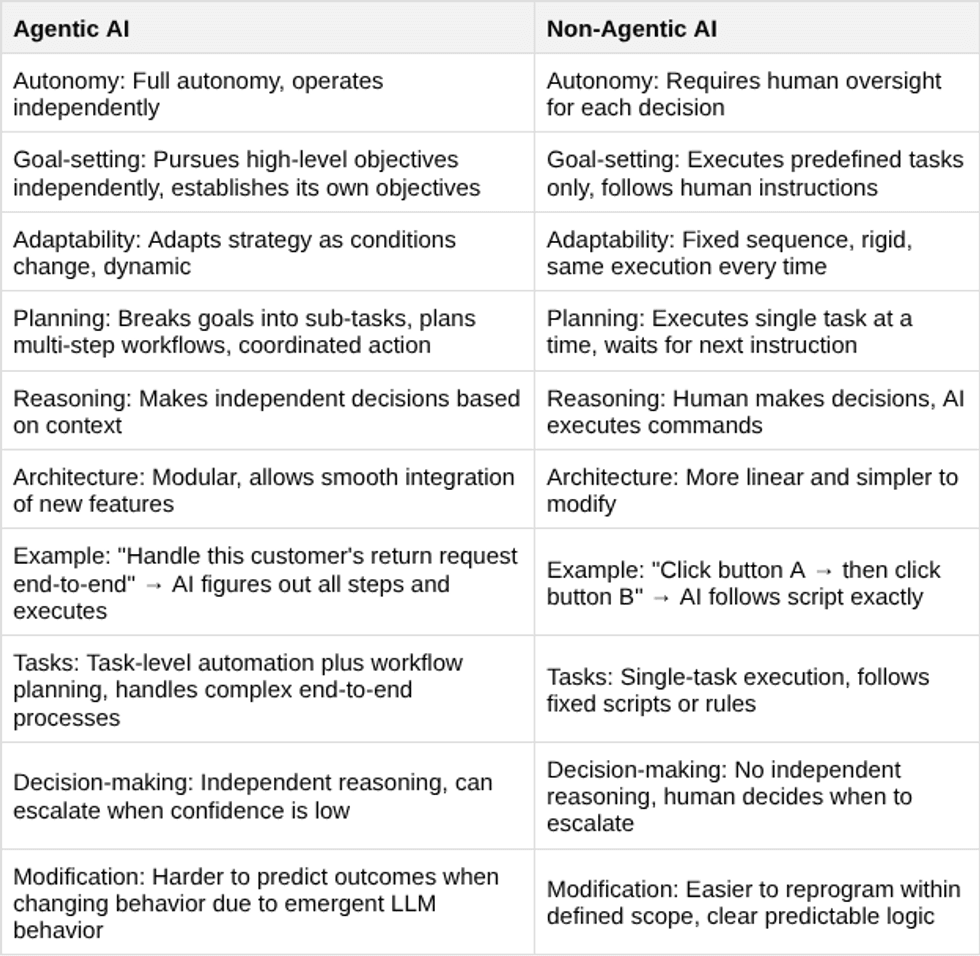
Originally, AI agents were non-agentic, similar to chatbots and AI-powered support platforms. But the term gets used loosely, and the differences matter when you're deciding what to buy:

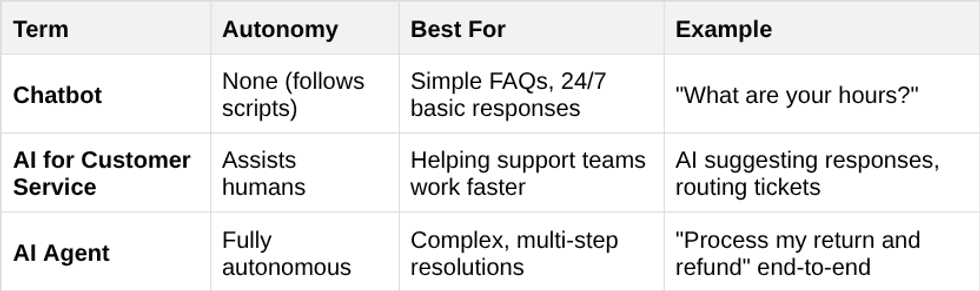
Differences Between Chatbots, AI-powered Support Platforms, and AI Agents

The term β€œAI agent” has a precise meaning in the industry, but you would not know it from browsing the market. True AI agents can reason through problems, take independent action, and complete multi-step tasks without a human directing each move.

Most of what gets sold under that label cannot do any of that. Instead, it is AI-powered customer service software, which can be genuinely useful, but it is not the same thing.

The distinction matters because if you search for "AI agent" and buy the first thing that comes up, there is a good chance you are buying something far less capable than the name implies.

This table explains the differences:

True AI agents typically cost 2-3x more than a chatbot, but a chatbot that can't resolve the issue just moves the cost to your support team.

Why SMBs Are Adopting AI Agents Now

Two-thirds of businesses that have already adopted AI agents report measurable productivity gains, according to PwC's AI Agent Survey. More than half say they're seeing real cost savings and faster decision-making. And 54% credit AI agents with improving the customer experience.

Customers today expect fast answers wherever they reach out, whether that's chat, email, or social. Hiring enough staff to cover all those channels around the clock isn't realistic for most small businesses. Basic chatbots are affordable, but anyone who's used one knows how quickly they hit a wall. AI agents are a different thing entirely. They can handle complex, multi-step conversations across channels without the overhead of a full support team.

Nearly three-quarters of executives surveyed expect their AI agent strategy to be a significant competitive advantage within the next 12 months, and 46% are already worried they're falling behind. That's not just enterprises competing with other enterprises. SMBs are going to feel this too, competing with other SMBs who move faster.

What to Look for When Choosing an AI Agent Platform

Knowing AI agents deliver results is one thing. Choosing the right platform is where most SMBs get stuck. Not all AI agent platforms are built the same, and the wrong choice can mean paying for capability you can't use or getting locked into something you'll outgrow. These six factors are worth evaluating before you commit to any platform:

1. Resolution Capability

The most important question to ask any vendor is whether their agent actually resolves issues or just routes them. Triaging a customer inquiry and handing it off to a human likely isn't much of an upgrade over what you already have.

Look for platforms with documented resolution rates across real customer interactions, not just demo scenarios. That track record is the clearest signal of whether the AI is actually doing the work.

2. Omnichannel Support

Your customers aren't reaching out through one channel, and your AI agent shouldn't be limited to one either. A platform that handles chat but not email, or email but not voice, creates gaps that fall on your team to cover.

The goal is a single platform managing every channel consistently, so customers get the same quality of response whether they text, call, email, or open a chat window.

3. Ease of Use for Non-Technical Teams

If your support team needs to file a ticket with engineering every time they want to update the agent, the platform is going to create friction fast. The best platforms let support leaders configure, adjust, and retrain the agent themselves. That independence matters, especially for SMBs, where engineering resources are limited and support needs change quickly.

4. Integration with Existing Tools

An AI agent that can't talk to your CRM, helpdesk, or knowledge base is working blind. It needs access to customer history, open tickets, and your existing documentation to give accurate, useful responses. Before committing to any platform, map out which tools it needs to connect to and verify those integrations exist and actually work, not just that they're listed on a features page.

5. Responsible AI and Governance

This one gets skipped more than it should, especially by SMBs. If your agent is handling customer data, billing questions, or anything sensitive, you need to know how it makes decisions and where humans provide oversight. Look for platforms with clear oversight controls, visibility into the agent's reasoning, and relevant compliance certifications. A governance failure isn't just a technical problem, it's a customer trust problem.

6. Scalability

The platform that fits your business today needs to fit even when you've doubled your support volume or expanded into new channels. Switching platforms mid-growth is expensive and disruptive. Ask vendors directly how their pricing and architecture scale, and look for case studies from businesses that started where you are now.

Platforms Worth Considering

These platforms specifically describe their offerings as agentic, meaning they can act autonomously rather than just assist humans. Here's what to know about each:

Zendesk

Zendesk AI for customer service deploys AI agents that handle customer requests end-to-end across every channel while giving human agents real-time access to relevant knowledge for the conversations they do handle. It's one of the more established platforms on this list, which shows in its governance approach. Zendesk holds ISO 42001 certification for AI management systems with clear transparency and human oversight controls, making it a good fit for SMBs that need enterprise-grade reliability without the infrastructure to match.

Tidio Lyro

Lyro Conversational AI Agent sits in a useful middle ground, more capable than basic automation, less complex than enterprise platforms. It handles customer conversations across chat, email, and social media while taking real action in your business systems, checking order statuses, updating customer records, scheduling appointments, and escalating to a human when needed. Every response is grounded in your verified support content to keep answers accurate. Lyro is designed for SMBs that want true agentic capability without enterprise-level complexity or cost.

Fin (formerly Intercom)

Fin AI Customer Agent handles more than half of all customer questions without human intervention, pulling answers from your internal content, websites, PDFs, and databases across 45 languages. What sets it apart is how deeply it connects to existing business systems. It can retrieve and update customer data, process account changes, and take action directly within Salesforce, HubSpot, and Freshdesk. For SMBs already running those tools, that level of integration means the agent isn't just answering questions, it's actually taking action.

Gorgias

AI Agent Gorgias is built specifically for ecommerce brands, which makes it a different kind of tool than the others on this list. It handles the full range of ecommerce support, including order status, returns, and shipping updates, while also functioning as a shopping assistant that can recommend products during the conversation. It resolves around 60% of inquiries autonomously, supports 80+ languages, and integrates directly with Shopify and other ecommerce platforms to access real-time order and inventory data. If your business sells online, it's worth a close look.

Freshdesk

Freddy AI Agent is Freshworks' autonomous customer support and IT service agent, handling questions across Freshdesk, Freshservice, and Freshchat from a single platform. It manages the full support process without human intervention, working across email, chat, voice, and messaging. The flexibility to build custom agents for specific use cases makes it a practical fit for mid-sized SMBs that have outgrown basic automation but aren't ready for enterprise complexity. If your business is already in the Freshworks ecosystem, the integration is seamless.

Questions to Ask Before You Buy

Here are some questions an SMB decision-maker should ask any vendor before signing:

  • What is the average resolution rate?
  • How are agents updated when your products or policies change?
  • What governance controls are in place?
  • How long does it take to set up and train the AI on my business?
  • What happens when the AI can't answer a question or gets stuck?
  • How much does it cost per conversation or per resolved ticket?
  • Can I see real customer data from companies similar to mine?
  • What integrations do you have with my existing tools?
  • How do you handle customer data privacy and security?

Getting Started: A Simple Path to First AI Agent Deployment

Choosing the right AI agent isn't about picking the most advanced technology. It's about finding a platform that resolves customer issues reliably, scales with your business, and operates with the transparency and accountability your customers expect.

Start With Low-Stakes Interactions

The smartest way to start is narrow. Pick one high-volume, low-complexity use case, like order status questions, password resets, or basic account inquiries. These are interactions your team handles dozens or hundreds of times a week, the answers don't change much, and a failed response doesn't put a customer relationship at serious risk.

Set Your Baseline Measurements First

Before you go live, define what success looks like in concrete terms: resolution rate, average handle time, customer satisfaction score, escalation rate. Pick one or two metrics that matter to your business and measure them before and after.

From there, adding a channel or a more complex use case is a much easier internal sell than asking leadership to approve an unproven investment. The businesses that get AI agents right aren't the ones who launched with the most sophisticated setup. They're the ones who started somewhere specific.

Customers Notice When Problems Actually Get Resolved

By 2027, AI will handle half of all service calls. What matters for your business is whether those interactions actually resolve your customers' problems. That's what agentic AI agents are built to do.

  •  

How to Choose a Web Design Company That Understands Your Customers


The right web design company can optimize your website for higher conversions. But who knows your customers better? You, or the design team you plan to hire? Because businesses and their customers have industry- and niche-specific needs, it’s critical that your web design company understands your business.

Great design happens when your customer knowledge meets designer expertise. But that isn’t enough anymore. You will also need search engine optimization (SEO) and conversion rate optimization (CRO).

Ruler Analytics reported in 2025 an average conversion rate of just 2.9% across fourteen industries. This means there is massive optimization potential.

Source: Ruler Analytics

With search traffic declining and zero-click searches becoming the norm, isn’t it time you optimized your website for conversions? This is where the right web design company comes in.

Choosing the Best Fit in Web Design Specialists

Choosing which web design company to hire is more complex than ever, as skill sets vary among developers. So, start with your business goals.

Do you only need a website or does it need to integrate with internal or third party systems, your CRM, or dashboards? Will you be integrating existing processes or is developing them part of this project’s roadmap?

Most web designers are not developers capable of building complex systems. Many do not even have experience integrating existing systems. There is also a difference between UX/UI designers and UX/UI developers. You need both, but you may not need AI UI/UX design or development.

Plan First: Would Your Site Benefit from AI UI/UX?

What is your vision for the totality of how your website interacts with existing processes?

Most businesses think in terms of individual needs:

  • CRM
  • Calendar/appointment setting
  • Call tracking
  • Inventory management
  • Accounting
  • Project management
  • Analytics

These individual needs vary by type of business. If there is a business case for it and you have the funding, integrating everything into an all-encompassing solution may be preferable.

But how do you know what to build? Take the advice of Marc Caposino, founder of the AI Design Agency Fuselab Creative:

β€œThe best user research happens in the wild. Watch how people currently solve the problem you’re addressing. What workarounds have they created? Where do they get frustrated? What do they do immediately after they complete the task?”

If you want to go beyond just having a website built, find an agency that has demonstrated success with similar projects.

Review Portfolios of Web Designs for Businesses Like Yours

Your business may seem simple to you because it is what you know. However, for many niches, that simply isn’t accurate. Stick to designers who specialize in your industry.

Most designers will have a page showing a portfolio that allows you to click through to live websites. Study their layouts and make notes about what you like and dislike.

When you’re searching for web designs, choose sites for businesses in your niche that are most similar to your own. For example, if you own a dental practice, search for β€œdental website design”. You may even want to look for differences between a site for a pediatric dentist versus an oral surgeon.

Some designers make that easier. For example, this dental web design portfolio uses filter tabs at the top to make navigation of their design portfolio intuitive and efficient.

Interview Niche-Specific Web Developers

Do not expect every web development company to be familiar with the requirements of your business. It is up to you to make sure they are qualified.

That is why I recommend you work with a company with experience in your industry. Here’s an example.

Dentistry doesn’t seem complicated. Everyone knows a dentist. But every dental practice offers different procedures. Not all do implants or offer Invisalign. Within dentistry, there are also specialties, such as orthodontists, pediatric dentists, oral surgeons, periodontists, and others.

While they all have a primary goal of scheduling patient appointments, some use a simple appointment form while others integrate with dental management software such as Dentrix and Oryx. Inquire whether the company you plan to hire is familiar with integrating any industry-specific applications your business uses.

Focus on Your Business Goals

Make a list of every application essential to your business. Determine which applications the developer you hire will need to incorporate into your website.

Include your:

  • CRM
  • Office management
  • Accounting package
  • Appointment booking
  • Advertising
  • Dashboards
  • Call tracking and analytics platforms

Failure to plan could mean delays and increased costs if you have to hire additional specialists or programmers to complete your project.

How to Know What Customers Want in Website Design

Use behavioral analytics tools to analyze how visitors to your site use it. There are many paid options, as well as the free option Microsoft Clarity. This video explains how this type of tool works and the pros and cons of HotJar versus Microsoft Clarity.

Now that you can do this at no cost, why wouldn’t you? Analytics tools can answer questions such as:

  • Are visitors clicking in the wrong place?
  • How often do they land on a page and immediately exit?
  • Did they leave your appointment scheduling option without completing it?

The answers to these questions can be indicators that your design needs improvement.

Ideally, your business should be willing to accommodate whatever your potential customers want in terms of how booking and other processes work.

I’ve had younger clients who only wanted customers to book their own appointments, yet they were running ads targeting an older, more prosperous demographic–then becoming unhappy that it was making their phone ring!

Involve an SEO Expert Before You Move an Existing Site

Over the decades, I’ve seen many sad stories of businesses losing traffic and incoming links because they launched a new website without 301 redirects of the existing URLs.

Any time you do a website redesign, an SEO expert should be involved. This is essential to avoid technical mistakes, slow load times, poor mobile responsiveness, or bad UX. If the development company will be handling the technical SEO of your site, ask for references specific to their SEO capabilities.

Test Your Website Before Launching

When you’re negotiating the contract for your website, make sure testing is included. A final testing process that catches problems before launch is essential. Even if the development company is doing this testing, repeat it in-house as well. Have someone with strong attention to detail read every page and test every link, form, and integration.

If you use third-party solutions, verify that those work and are optimally configured. For example, appointment setting apps may have two to three steps or as many as 14! Every additional step can reduce conversions. If one-click checkout works best for Amazon, why would anyone think asking 14 questions is a good idea?

Reassess what information you’re asking potential customers for. Call in a few favors and observe others go through the process of buying or booking on your website. Any confusion will cause abandonment, so watch for any hurdles that slow the process.

With search traffic declining, it's crucial to make the most of every visitor to your site by increasing conversions. To do this, you’ll need to streamline appointment scheduling and checkout processes to ensure as little friction as possible.

Remember that your website is an extension of your brand’s reputation. To make a great impression on visitors, you’ll want to make sure everything works perfectly.

  •  
❌